
Read Korean in your own language, sentence by sentence and word by word
Photograph a page of a Korean book, or share an article or a screenshot. SnapPara shows the Korean with its translation, sentence by sentence, in any of 40 languages. Tap a word you don’t know for its dictionary entry, every meaning with a short definition, in English, Chinese, French, Indonesian, Japanese, Russian, Spanish, Thai or Vietnamese.






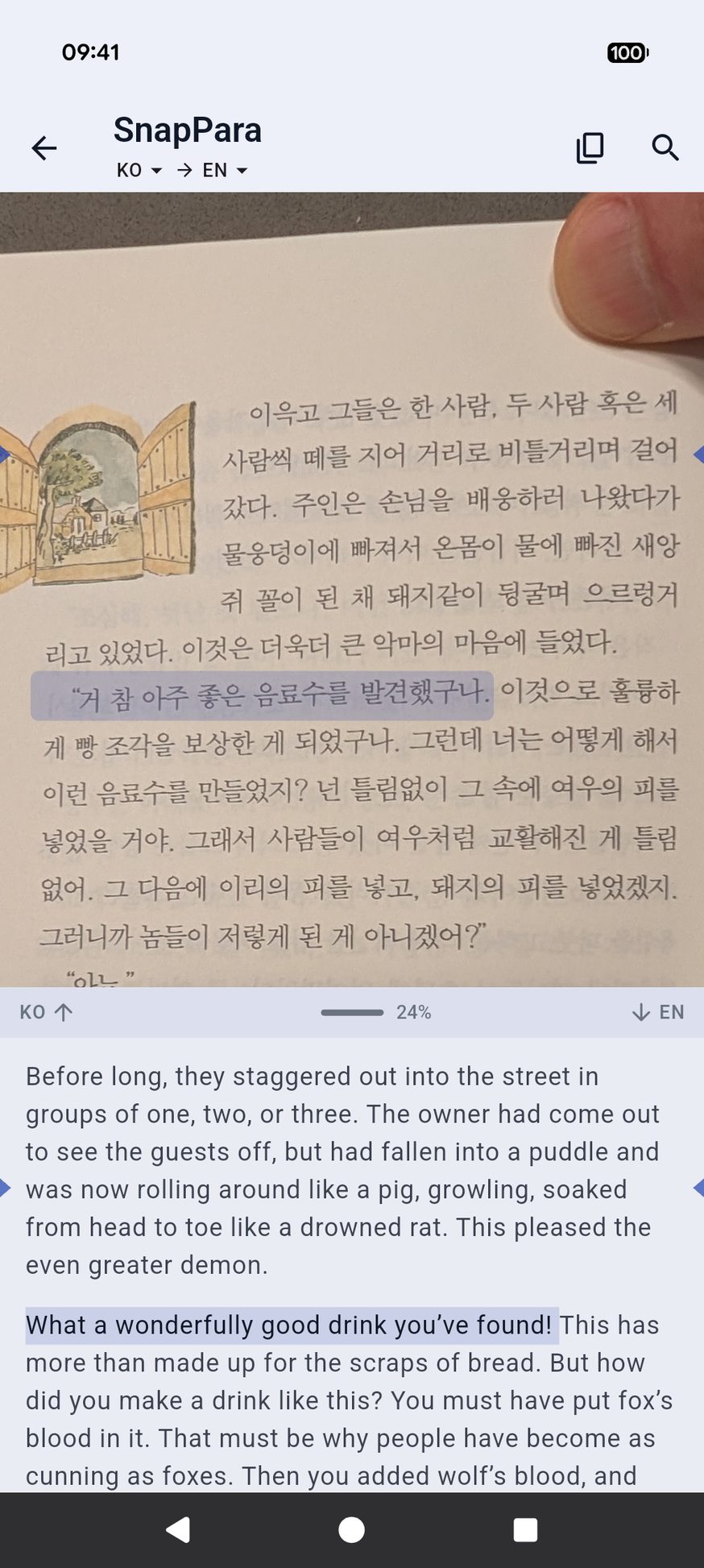
Read with the translation
See it work
Read the page with its translation
SnapPara puts the Korean page above its translation, one sentence at a time. Tap a sentence to highlight it in both languages, so you always know which line you are reading.
Tap a word for its dictionary entry
- Every meaning, with a short definition, in English, Chinese, French, Indonesian, Japanese, Russian, Spanish, Thai and Vietnamese.
- In any other language, the word’s translation; ask AI for a fuller explanation when you need one.
- Words with endings are found too: 먹었다 under 먹다, 학교에서 under 학교.
- Dictionary entries work offline once downloaded.
- Save the word with its sentence; it comes back on your flashcards and exports to Anki, Quizlet or PDF.
Try it on a classic Korean short story you can open online: Korean parallel text.
Every language SnapVerbo reads and translates into is on Language pairs.
Questions
- Which languages can I read Korean in?
- SnapPara translates Korean into 40 languages, so you can read a Korean page beside a translation in almost any language you know. The Language pairs page lists them all.
- What is the difference between a translation and a dictionary entry?
- A translation gives you the word as it reads in that sentence. A dictionary entry lists the word’s meanings, each with a short definition, so you can see which one the sentence uses. Tapped Korean words get a dictionary entry in English, Chinese, French, Indonesian, Japanese, Russian, Spanish, Thai and Vietnamese. In other languages you get a translation, and you can ask AI for a fuller explanation.
- Does it find words with endings, like 먹었다 or 학교에서?
- Yes. A tap picks the whole word, and SnapVerbo looks it up under its dictionary form: 먹었다 under 먹다, 학교에서 under 학교.
- Do I need an EPUB, PDF or text file of the book?
- No. Photograph a page of any paper book you own, or share an article or a screenshot, or paste text. There is nothing to convert or upload, and you are not limited to a ready-made library of books.
- Is it free?
- The app is free, with no account needed. Tapping a word is always free, and dictionary entries work offline. Translating a whole page in SnapPara and asking AI about a word use credits, which you earn by watching a short ad.
This page in other languages: 日本語 · 中文 · Tiếng Việt · Bahasa Indonesia · ไทย · Français · Español · Русский