
Korean parallel text from any page you read
Photograph a page of a Korean book, share a web page or paste a few paragraphs. SnapPara shows the Korean with its English translation, sentence by sentence.






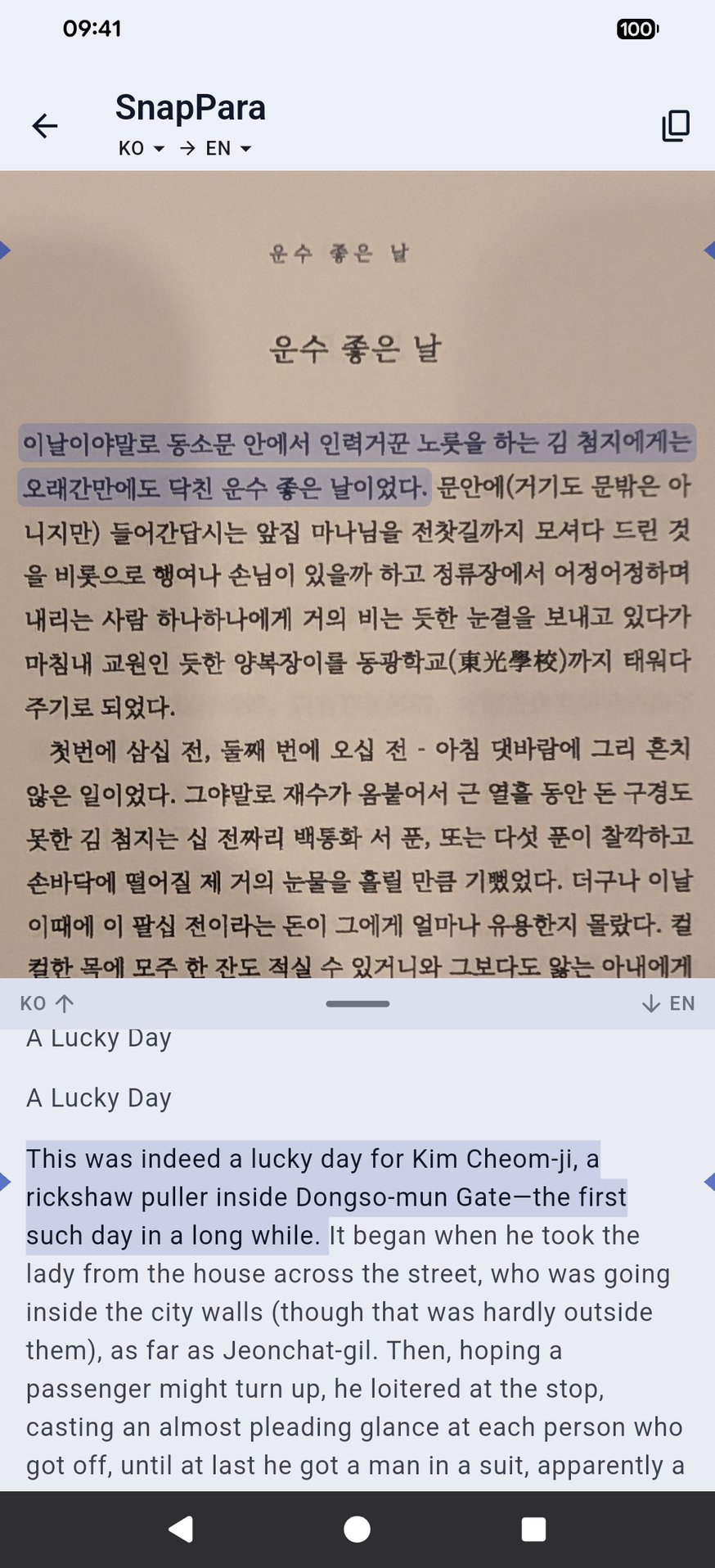
Korean above, English below
What it looks like
The opening of Hyun Jin-geon's 운수 좋은 날 (A Lucky Day), photographed from a printed page, with the English SnapPara gave:
이날이야말로 동소문 안에서 인력거꾼 노릇을 하는 김 첨지에게는 오래간만에도 닥친 운수 좋은 날이었다.
This was indeed a lucky day for Kim Cheom-ji, a rickshaw puller inside Dongso-mun Gate—the first such day in a long while.
첫번에 삼십 전, 둘째 번에 오십 전 - 아침 댓바람에 그리 흔치 않은 일이었다.
Thirty jeon on the first trip, fifty on the second—such good fortune was rare so early in the morning.
Tap a sentence and it lights up in both languages. Tap a word to hear it and save it with the sentence and its translation; it comes back on your flashcards. The translation can be into your own language instead of English.
What to read
Any Korean you already have works: a paperback, a news site, a screenshot of an app. If you're looking for something, these are free and public domain:
- 운수 좋은 날, 현진건 (Hyun Jin-geon) (Wikisource) — a short story read in Korean schools.
- 메밀꽃 필 무렵, 이효석 (Lee Hyo-seok) (Wikisource) — a short story with famously lyrical prose.
- 동백꽃, 김유정 (Kim Yu-jeong) (Wikisource) — a short, funny country story.
Open a chapter in your phone's browser and share it to SnapVerbo, or photograph a printed page.
Reading Korean in SnapVerbo
- A tap picks the whole word with its ending. The arrows drop the ending: 도서관에서 becomes 도서관 (library).
- Words borrowed from Chinese show their Hanja on the word card (설렁탕: ‑湯).
- SnapPara reads Korean written across the page, which is how almost all modern Korean is printed.
Questions
- Can I read Korean short stories with English side by side?
- Yes. Open a story on Wikisource and share it to SnapVerbo, or photograph a page of your own copy. SnapPara shows each Korean sentence with its English translation.
- Does it work with vertical Korean?
- Not yet. SnapPara reads Korean written across the page, which is how almost all modern Korean is printed.
- Is the translation only into English?
- No. SnapPara translates Korean into many languages; set the one you want. This page uses English as the example.
- Is it free?
- Yes, free forever, with no account needed. Short ads help cover the cost of AI translation.