
Japanese parallel text from any page you read
Photograph a horizontally printed page, share a web page or paste a few paragraphs. SnapPara shows the Japanese with its English translation, sentence by sentence, and each word you tap comes with its reading.






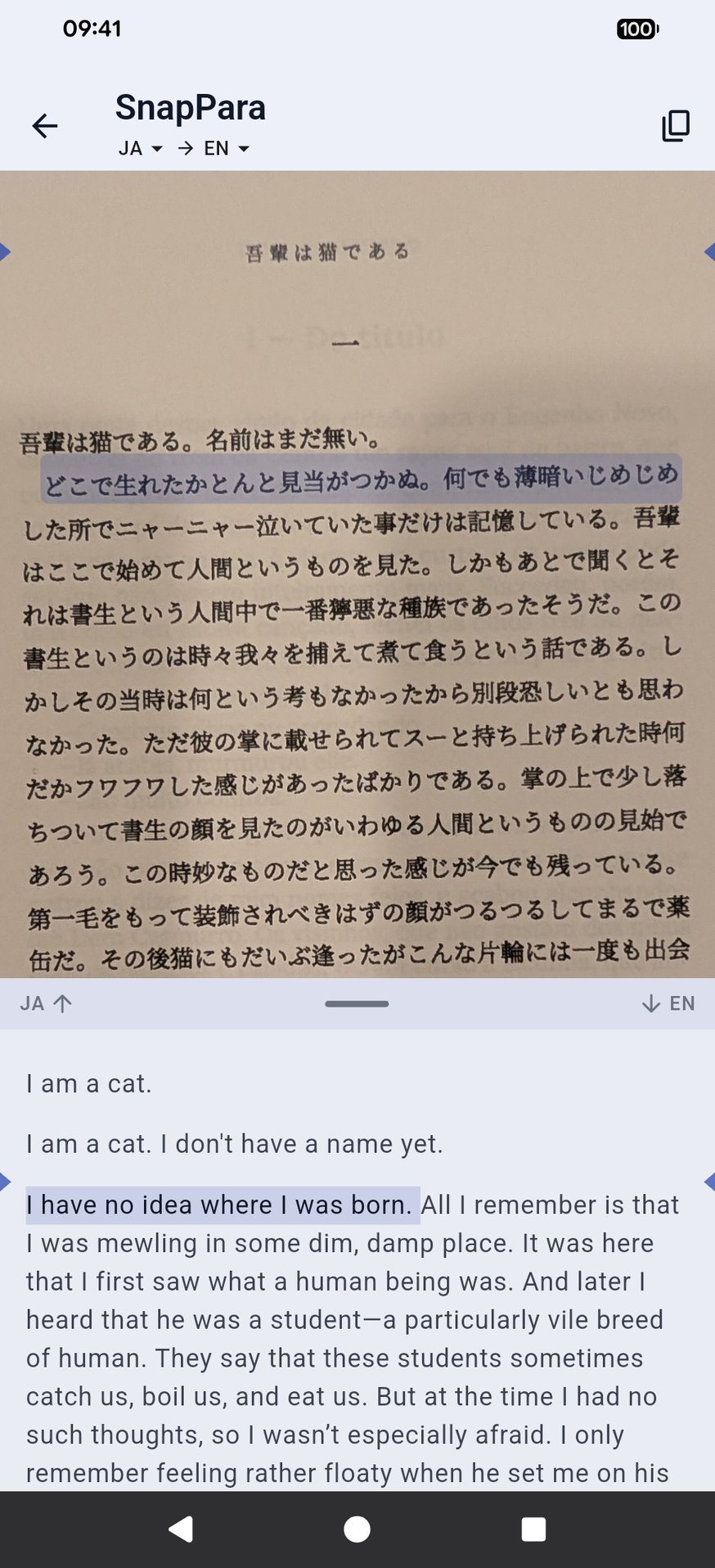
Japanese above, English below
What it looks like
The opening of Natsume Sōseki's 吾輩は猫である (I Am a Cat), photographed from a printed page, with the English SnapPara gave:
吾輩は猫である。
I am a cat.
名前はまだ無い。
I don't have a name yet.
どこで生れたかとんと見当がつかぬ。
I have no idea where I was born.
何でも薄暗いじめじめした所でニャーニャー泣いていた事だけは記憶している。
All I remember is that I was mewling in some dim, damp place.
Tap a sentence and it lights up in both languages. Tap a word to hear it and save it with the sentence and its translation; it comes back on your flashcards. The translation can be into your own language instead of English.
What to read
Japanese you already read works if it runs across the page: a news site, a screenshot of an app, a textbook or a horizontally printed book. If you're looking for something, these are free and public domain:
- 吾輩は猫である, 夏目漱石 (Natsume Sōseki) (Aozora Bunko) — the cat narrator, chapter by chapter.
- 坊っちゃん, 夏目漱石 (Natsume Sōseki) (Aozora Bunko) — shorter and funnier.
- 蜘蛛の糸, 芥川龍之介 (Akutagawa Ryūnosuke) (Aozora Bunko) — a very short story for a first try.
Open a chapter in your phone's browser and share it to SnapVerbo, or photograph a printed page.
Reading Japanese in SnapVerbo
- Each word card shows the reading (名前: なまえ) and the JMdict definition.
- A tap picks the whole word, not a single character. If it picked too much or too little, the arrows add or drop a character.
- SnapPara reads Japanese written across the page. For a book set in vertical columns, share a web edition such as Aozora Bunko instead.
Questions
- Can I read Japanese novels with English side by side?
- Yes, from a photo of a horizontally printed page, a web page shared from your browser, or pasted text. SnapPara shows each Japanese sentence with its English translation.
- Does it work with vertical Japanese?
- Not yet. SnapPara reads Japanese written across the page. For books printed in vertical columns, use a web edition such as Aozora Bunko.
- Does it show furigana?
- The word card shows the reading of the word you tap, in kana.
- Is it free?
- Yes, free forever, with no account needed. Short ads help cover the cost of AI translation.