
Chinese parallel text from any page you read
Photograph a page of a Chinese book, share a web page or paste a few paragraphs. SnapPara shows the Chinese with its English translation, sentence by sentence, and each word you tap comes with its pinyin.






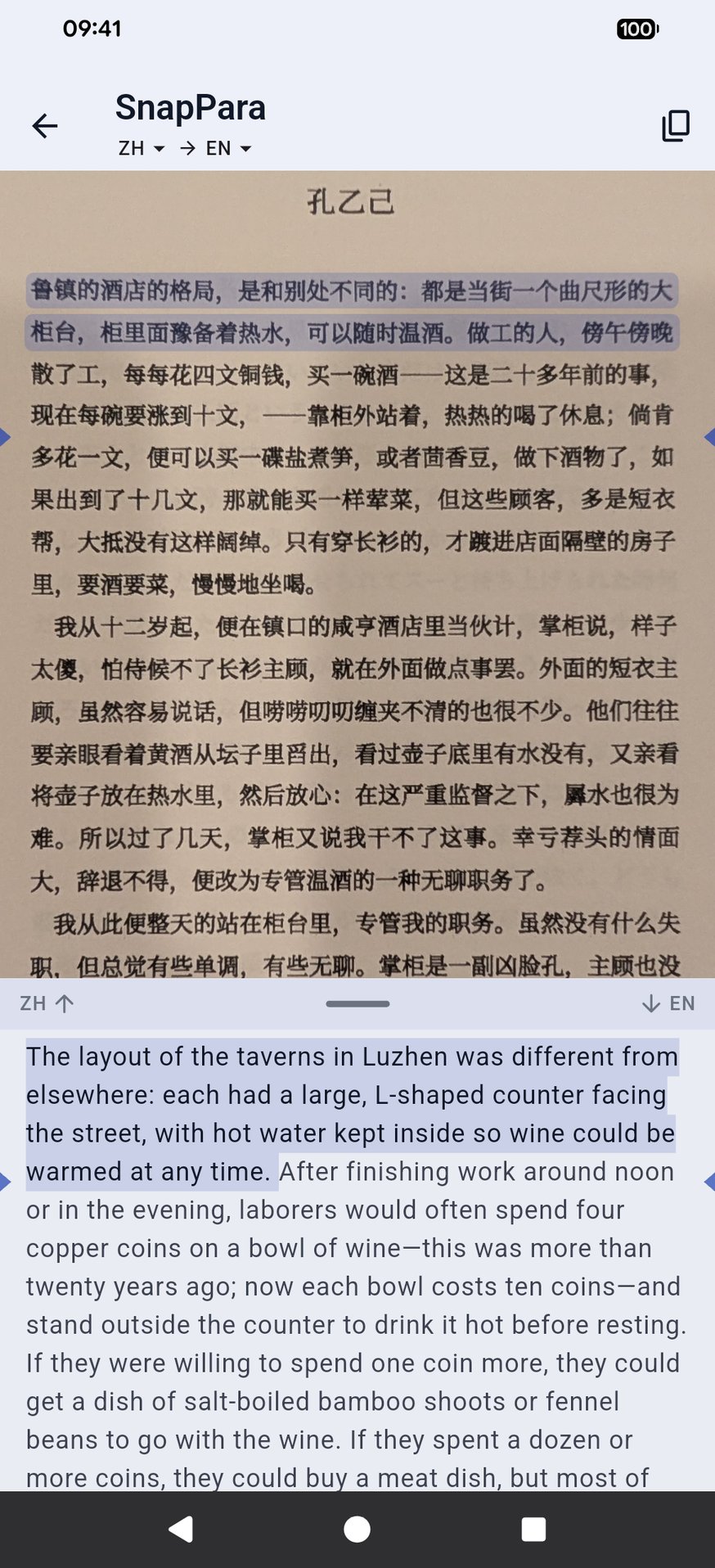
Chinese above, English below
What it looks like
The opening of Lu Xun's 孔乙己 (Kong Yiji), photographed from a printed page, with the English SnapPara gave:
鲁镇的酒店的格局,是和别处不同的:都是当街一个曲尺形的大柜台,柜里面预备着热水,可以随时温酒。
The layout of the taverns in Luzhen was different from elsewhere: each had a large, L-shaped counter facing the street, with hot water kept inside so wine could be warmed at any time.
只有穿长衫的,才踱进店面隔壁的房子里,要酒要菜,慢慢地坐喝。
Only those wearing long gowns would go into the room beside the shop, order wine and food, and sit drinking at their leisure.
Tap a sentence and it lights up in both languages. Tap a word to hear it and save it with the sentence and its translation; it comes back on your flashcards. The translation can be into your own language instead of English.
What to read
Any Chinese you already have works: a paperback, a news site, a screenshot of an app. If you're looking for something, these are free and public domain:
- 孔乙己, 鲁迅 (Lu Xun) (Wikisource) — a short story, about four pages.
- 藥, 鲁迅 (Lu Xun) (Wikisource) — another short story from the same collection.
- 阿Q正傳, 鲁迅 (Lu Xun) (Wikisource) — his best-known novella.
Open a chapter in your phone's browser and share it to SnapVerbo, or photograph a printed page.
Reading Chinese in SnapVerbo
- Each word card shows the pinyin (柜台: guì tái) and the CC-CEDICT definition.
- A tap picks the whole word, not a single character. If it picked too much or too little, the arrows add or drop a character.
Questions
- Can I read Lu Xun in Chinese with English side by side?
- Yes. Open a story on Wikisource and share it to SnapVerbo, or photograph a page of your own copy. SnapPara shows each Chinese sentence with its English translation.
- Does it show pinyin?
- Yes, on the card for each word you tap, with its dictionary meaning.
- Is the translation only into English?
- No. SnapPara translates Chinese into many languages; set the one you want. This page uses English as the example.
- Is it free?
- Yes, free forever, with no account needed. Short ads help cover the cost of AI translation.